Clean Code Chapter 3: Functions Should Do One Thing, and Do It Well
My key learnings from Chapter 3 of Clean Code by Robert C. Martin. This chapter taught me that small, focused functions are easier to read, test, maintain, and understand than large functions that try to do everything.
Clean Code Chapter 3: Functions Should Do One Thing, and Do It Well
After reading Chapter 2 about naming, I moved on to Chapter 3 of Clean Code, which focuses on one of the most fundamental building blocks of software:
Functions.
At first, writing functions seems simple.
You create a method, put your logic inside it, and move on.
But after reading this chapter, I realized that many of the problems we face in codebases come from poorly designed functions.
The central message of this chapter is surprisingly simple:
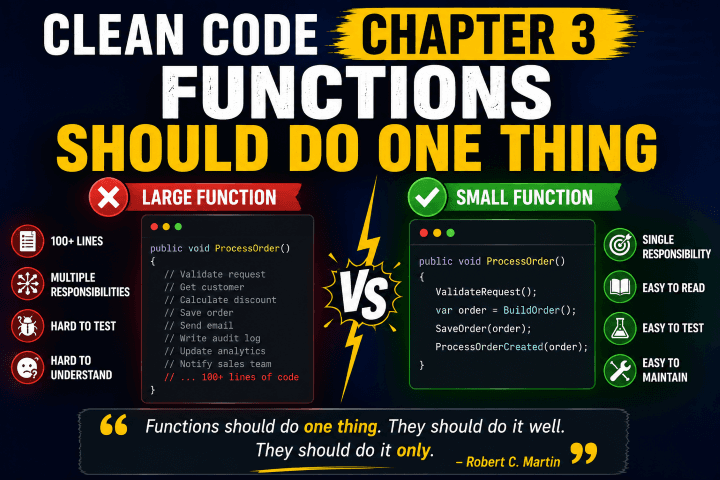
Functions should do one thing. They should do it well. They should do it only.
It sounds easy.
In reality, it's one of the hardest principles to follow consistently.
Why Large Functions Become a Problem
Most large functions don't start large.
They grow over time.
A new requirement comes in.
A validation gets added.
A logging statement appears.
An email notification gets added.
Before long, a simple function becomes hundreds of lines long.
For example:
public async Task CreateOrder(CreateOrderRequest request)
{
    ValidateRequest(request);

    var customer = await GetCustomer(request.CustomerId);

    CalculateDiscount(customer);

    SaveOrder();

    SendConfirmationEmail();

    WriteAuditLog();

    UpdateAnalytics();

    NotifySalesTeam();
}
At first glance, this looks fine.
But if we look closely, the function is doing many different jobs:
- Validation
- Business logic
- Persistence
- Email notifications
- Logging
- Analytics
- Team notifications
That's multiple responsibilities in a single method.
Functions Should Do One Thing
Instead of one large function, we can break the work into smaller, meaningful functions.
public async Task CreateOrder(CreateOrderRequest request)
{
    ValidateRequest(request);

    var order = await BuildOrder(request);

    await SaveOrder(order);

    await ProcessOrderCreated(order);
}
Now the high-level workflow is easy to understand.
The details are hidden behind well-named methods.
The reader understands the process without being distracted by implementation details.
Small Functions Are Easier to Read
One lesson that stood out to me is that function size matters.
Robert C. Martin argues that functions should be small.
Very small.
Many developers are comfortable with functions that are 50 or 100 lines long.
The book challenges that idea.
A small function is:
- Easier to understand
- Easier to debug
- Easier to test
- Easier to reuse
When a function fits on a screen, you can often understand its purpose immediately.
One Level of Abstraction Per Function
This was one of the most interesting concepts in the chapter.
Consider this example:
public void ProcessOrder()
{
    ValidateCustomer();

    if (customer.IsPremium)
    {
        ApplyPremiumDiscount();
    }

    sqlConnection.Execute(sqlQuery);

    SendEmail();
}
Notice how the function jumps between different levels of detail.
Some lines are high-level business operations.
Others are low-level implementation details.
The chapter recommends keeping functions at a single level of abstraction.
For example:
public void ProcessOrder()
{
    ValidateCustomer();

    ApplyDiscounts();

    SaveOrder();

    NotifyCustomer();
}
Now the function reads almost like a story.
Avoid Boolean Parameters
This lesson immediately made me think about code I've written before.
Consider:
GenerateReport(true);
What does true mean?
Nobody knows without inspecting the method.
Now imagine:
GenerateDetailedReport();
or
GenerateSummaryReport();
The intent is immediately clear.
Boolean parameters often indicate that a function is doing more than one thing.
Reduce the Number of Arguments
Functions become harder to understand as parameters increase.
For example:
CreateUser(
    firstName,
    lastName,
    email,
    phone,
    address,
    role,
    department
);
This is difficult to read and easy to misuse.
A better approach is often:
CreateUser(user);
Using meaningful objects can simplify method signatures and improve readability.
Avoid Side Effects
A function should do what its name promises.
Nothing more.
Imagine this method:
CheckPassword();
You expect it to validate a password.
But what if it also:
- Updates the database
- Writes logs
- Sends notifications
Now the function has hidden behavior.
These unexpected actions are called side effects.
Side effects make code harder to understand and maintain.
Command Query Separation
One concept I particularly liked was:
A function should either do something or answer something. Not both.
For example:
Bad:
if (user.Save())
{
}
The method both performs an action and returns information.
Better:
SaveUser(user);

bool exists = UserExists(id);
Commands change state.
Queries return information.
Keeping them separate improves clarity.
My Biggest Takeaway
Before reading this chapter, I often thought about whether a function worked.
Now I think more about whether the function has a clear responsibility.
When a function becomes difficult to name, that's often a sign it's doing too much.
When a function requires extensive comments, that's often a sign it's doing too much.
When a function has many parameters, that's often a sign it's doing too much.
Most function-related problems can be traced back to one issue:
The function has too many responsibilities.
Final Thoughts
Chapter 3 taught me that great software isn't built from clever functions.
It's built from simple functions that are easy to understand.
Small functions.
Focused functions.
Functions that do one thing and do it well.
Going forward, I'll spend more time breaking large methods into smaller, meaningful pieces.
Not because the compiler needs it.
Because future developers do.
Including my future self.
What About You?
What's the largest function you've ever encountered in a production codebase?
And what techniques do you use to keep your functions clean and maintainable?
Share this article

Dabananda Mitra
Software Engineer specializing in scalable backend systems and minimal, effective API design.
Comments
Loading comments...
More Writings
Clean Code Chapter 4: Comments Are Not a Substitute for Clean Code
My key learnings from Chapter 4 of Clean Code by Robert C. Martin. This chapter changed how I think about comments and taught me why writing self-explanatory code is often better than explaining code with comments.
Read Article →BooksClean Code Chapter 1: The Lesson That Changed How I Think About Writing Software
After reading Chapter 1 of Clean Code by Robert C. Martin, I realized that writing code isn't just about making it work. It's about making it readable, maintainable, and easy for future developers—including yourself—to understand.
Read Article →BooksClean Code Chapter 2: Why Naming Is One of the Hardest Parts of Programming
My key learnings from Chapter 2 of Clean Code by Robert C. Martin. This chapter taught me that good names can make code self-explanatory, while poor names can make even simple code difficult to understand.
Read Article →