Clean Code Chapter 2: Why Naming Is One of the Hardest Parts of Programming
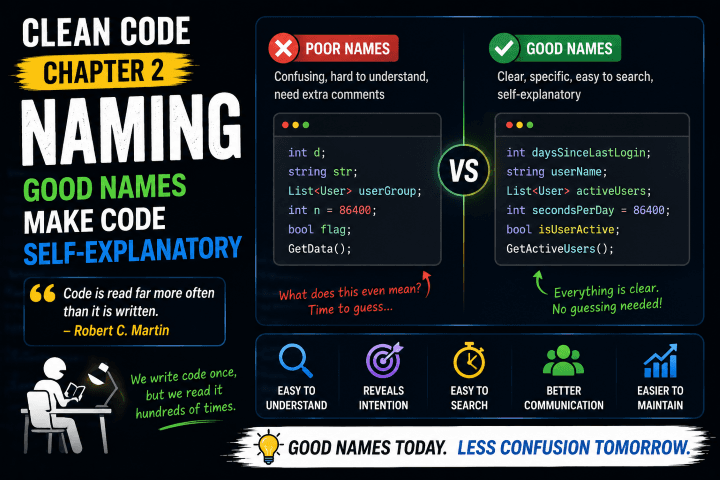
My key learnings from Chapter 2 of Clean Code by Robert C. Martin. This chapter taught me that good names can make code self-explanatory, while poor names can make even simple code difficult to understand.
Clean Code Chapter 2: Why Naming Is One of the Hardest Parts of Programming
After finishing Chapter 1 of Clean Code, I moved on to Chapter 2, which focuses entirely on naming.
At first, I thought:
"Can an entire chapter about naming really be that important?"
After reading it, I understood why Robert C. Martin dedicated a whole chapter to the topic.
Naming is one of the most important skills in software development.
We write variable names, method names, class names, database table names, API endpoints, and file names every day.
Poor names create confusion.
Good names make code explain itself.
The biggest lesson I learned from this chapter is:
Code is read far more often than it is written, and names are the first thing people read.
Why Naming Matters
Imagine seeing this code:
int d;
What does d mean?
- Days?
- Distance?
- Discount?
- Duration?
Nobody knows.
Now compare it to:
int daysSinceLastLogin;
The second version immediately communicates its purpose.
No comments needed.
No guessing required.
Good names reduce the mental effort required to understand code.
Use Intention-Revealing Names
One of the core principles from the chapter is:
A name should reveal its purpose.
Instead of:
var x = GetData();
Write:
var activeUsers = GetActiveUsers();
When someone reads the code, they should understand what the variable represents without having to inspect the implementation.
A good name answers questions before they are asked.
Avoid Disinformation
Some names actively mislead readers.
For example:
List<User> userGroup;
The word Group may imply a specific business concept rather than a collection.
Similarly:
Account accountInfo;
If it's an Account, call it Account.
Adding unnecessary words often creates confusion instead of clarity.
Names should be accurate.
Not just descriptive.
Make Meaningful Distinctions
One mistake many developers make is creating names that differ only slightly.
For example:
Product product;
Product productData;
Product productInfo;
These names are technically different.
But they don't clearly communicate different responsibilities.
The reader is left wondering:
- What's the difference?
- When should I use one instead of another?
A good distinction should add meaning, not just different words.
Use Searchable Names
This was one of my favorite points from the chapter.
Consider:
const int x = 86400;
What does 86400 represent?
Now imagine searching for all references to x.
You'll likely get hundreds of unrelated results.
Instead:
const int SecondsPerDay = 86400;
Now the intent is obvious.
And finding usages becomes much easier.
Searchable names save time every day.
Avoid Mental Mapping
Developers shouldn't need to translate names in their heads.
This:
int n;
requires interpretation.
This:
int customerCount;
does not.
The reader shouldn't have to maintain a dictionary to understand the code.
The code itself should communicate clearly.
Class Names and Method Names
The chapter also provides practical naming guidance.
Class Names
Classes should usually be nouns.
Examples:
Customer
Order
ProductRepository
InvoiceGenerator
These names represent things.
Method Names
Methods should usually be verbs.
Examples:
CreateOrder()
CalculateTotal()
SendEmail()
GetCustomerById()
These names represent actions.
Following this convention makes code feel natural to read.
Pick One Word Per Concept
Consistency matters.
Imagine finding all of these in the same codebase:
GetUser()
FetchUser()
RetrieveUser()
LoadUser()
Do they mean different things?
Or are they identical?
Nobody knows.
The chapter recommends choosing one word and using it consistently.
For example:
GetUser()
GetProduct()
GetOrder()
Consistency reduces confusion.
My Biggest Takeaway
Before reading this chapter, I thought naming was mostly about personal preference.
Now I see it differently.
Naming is a design decision.
Good names reduce complexity.
Good names improve maintainability.
Good names make systems easier to understand.
In many cases, choosing the right name is more valuable than writing additional comments.
Final Thoughts
Chapter 2 taught me that clean code starts with clear communication.
And communication starts with names.
The best code often feels easy to read not because the logic is simple, but because the names make the intent obvious.
Going forward, I'll spend more time thinking about naming before writing code.
Because a well-chosen name can save countless hours of confusion for future developers.
Including my future self.
What About You?
What's the worst variable, method, or class name you've ever seen in a codebase?
And what's your favorite naming convention that improves readability?
Share this article

Dabananda Mitra
Software Engineer specializing in scalable backend systems and minimal, effective API design.
Comments
Loading comments...
More Writings
Clean Code Chapter 4: Comments Are Not a Substitute for Clean Code
My key learnings from Chapter 4 of Clean Code by Robert C. Martin. This chapter changed how I think about comments and taught me why writing self-explanatory code is often better than explaining code with comments.
Read Article →BooksClean Code Chapter 1: The Lesson That Changed How I Think About Writing Software
After reading Chapter 1 of Clean Code by Robert C. Martin, I realized that writing code isn't just about making it work. It's about making it readable, maintainable, and easy for future developers—including yourself—to understand.
Read Article →BooksClean Code Chapter 3: Functions Should Do One Thing, and Do It Well
My key learnings from Chapter 3 of Clean Code by Robert C. Martin. This chapter taught me that small, focused functions are easier to read, test, maintain, and understand than large functions that try to do everything.
Read Article →